




V38.2+V43.6
![PIWIS III with V38.2+V43.6 Piwis Software Installed on Lenovo Yoga i5 8g Touch Screen Laptop[Free Shipping] - immagine 1](https://www.storevaluer.com/wp-content/uploads/2026/06/f8d5bcdafbc2e1d94b7ee02da40b689f.jpg "PIWIS III with V38.2+V43.6 Piwis Software Installed on Lenovo Yoga i5 8g Touch Screen Laptop[Free Shipping] 1")
![PIWIS III with V38.2+V43.6 Piwis Software Installed on Lenovo Yoga i5 8g Touch Screen Laptop[Free Shipping] - immagine 2](https://www.storevaluer.com/wp-content/uploads/2026/06/2_419f24c4-e61b-4ce6-b6d5-ca06fac3d024.jpg "PIWIS III with V38.2+V43.6 Piwis Software Installed on Lenovo Yoga i5 8g Touch Screen Laptop[Free Shipping] 2")
![PIWIS III with V38.2+V43.6 Piwis Software Installed on Lenovo Yoga i5 8g Touch Screen Laptop[Free Shipping] - immagine 3](https://www.storevaluer.com/wp-content/uploads/2026/06/1_8fc7eb0f-06c3-46f1-b28d-f2be4deefba6.jpg "PIWIS III with V38.2+V43.6 Piwis Software Installed on Lenovo Yoga i5 8g Touch Screen Laptop[Free Shipping] 3")
![PIWIS III with V38.2+V43.6 Piwis Software Installed on Lenovo Yoga i5 8g Touch Screen Laptop[Free Shipping] - immagine 4](https://www.storevaluer.com/wp-content/uploads/2026/06/26f19e680d1c67a5f2bd61f018a4efd1.jpg "PIWIS III with V38.2+V43.6 Piwis Software Installed on Lenovo Yoga i5 8g Touch Screen Laptop[Free Shipping] 4")
![PIWIS III with V38.2+V43.6 Piwis Software Installed on Lenovo Yoga i5 8g Touch Screen Laptop[Free Shipping] - immagine 5](https://www.storevaluer.com/wp-content/uploads/2026/06/20191231142611_084636b1-99b0-4519-acc9-7b663b032014.jpg "PIWIS III with V38.2+V43.6 Piwis Software Installed on Lenovo Yoga i5 8g Touch Screen Laptop[Free Shipping] 5")
![PIWIS III with V38.2+V43.6 Piwis Software Installed on Lenovo Yoga i5 8g Touch Screen Laptop[Free Shipping] - immagine 6](https://www.storevaluer.com/wp-content/uploads/2026/06/4d0176b8084bd277_2eb88ada-0fb2-496f-bad4-7933108f63c5.jpg "PIWIS III with V38.2+V43.6 Piwis Software Installed on Lenovo Yoga i5 8g Touch Screen Laptop[Free Shipping] 6")
![PIWIS III with V38.2+V43.6 Piwis Software Installed on Lenovo Yoga i5 8g Touch Screen Laptop[Free Shipping] - immagine 7](https://www.storevaluer.com/wp-content/uploads/2026/06/OEMPiwis3withLenovoYogatouchscreenLaptop_1_I5_b5a09f0d-b911-4af6-a3ef-dcdbb4f06459.png "PIWIS III with V38.2+V43.6 Piwis Software Installed on Lenovo Yoga i5 8g Touch Screen Laptop[Free Shipping] 7")
![PIWIS III with V38.2+V43.6 Piwis Software Installed on Lenovo Yoga i5 8g Touch Screen Laptop[Free Shipping] - immagine 8](https://www.storevaluer.com/wp-content/uploads/2026/06/piwis.png "PIWIS III with V38.2+V43.6 Piwis Software Installed on Lenovo Yoga i5 8g Touch Screen Laptop[Free Shipping] 8")
![PIWIS III with V38.2+V43.6 Piwis Software Installed on Lenovo Yoga i5 8g Touch Screen Laptop[Free Shipping] - immagine 9](https://www.storevaluer.com/wp-content/uploads/2026/06/piwis_48493238-b588-4b15-83a6-2da56a43ba38.png "PIWIS III with V38.2+V43.6 Piwis Software Installed on Lenovo Yoga i5 8g Touch Screen Laptop[Free Shipping] 9")
![PIWIS III with V38.2+V43.6 Piwis Software Installed on Lenovo Yoga i5 8g Touch Screen Laptop[Free Shipping] - immagine 10](https://www.storevaluer.com/wp-content/uploads/2026/06/piwis3softwareupdateservice2.png "PIWIS III with V38.2+V43.6 Piwis Software Installed on Lenovo Yoga i5 8g Touch Screen Laptop[Free Shipping] 10")
![PIWIS III with V38.2+V43.6 Piwis Software Installed on Lenovo Yoga i5 8g Touch Screen Laptop[Free Shipping]](https://www.storevaluer.com/wp-content/uploads/2026/06/f8d5bcdafbc2e1d94b7ee02da40b689f-150x150.jpg)
![PIWIS III with V38.2+V43.6 Piwis Software Installed on Lenovo Yoga i5 8g Touch Screen Laptop[Free Shipping] - immagine 2](https://www.storevaluer.com/wp-content/uploads/2026/06/2_419f24c4-e61b-4ce6-b6d5-ca06fac3d024-150x150.jpg)
![PIWIS III with V38.2+V43.6 Piwis Software Installed on Lenovo Yoga i5 8g Touch Screen Laptop[Free Shipping] - immagine 3](https://www.storevaluer.com/wp-content/uploads/2026/06/1_8fc7eb0f-06c3-46f1-b28d-f2be4deefba6-150x150.jpg)
![PIWIS III with V38.2+V43.6 Piwis Software Installed on Lenovo Yoga i5 8g Touch Screen Laptop[Free Shipping] - immagine 4](https://www.storevaluer.com/wp-content/uploads/2026/06/26f19e680d1c67a5f2bd61f018a4efd1-150x164.jpg)
![PIWIS III with V38.2+V43.6 Piwis Software Installed on Lenovo Yoga i5 8g Touch Screen Laptop[Free Shipping] - immagine 5](https://www.storevaluer.com/wp-content/uploads/2026/06/20191231142611_084636b1-99b0-4519-acc9-7b663b032014-150x150.jpg)
![PIWIS III with V38.2+V43.6 Piwis Software Installed on Lenovo Yoga i5 8g Touch Screen Laptop[Free Shipping] - immagine 6](https://www.storevaluer.com/wp-content/uploads/2026/06/4d0176b8084bd277_2eb88ada-0fb2-496f-bad4-7933108f63c5-150x150.jpg)
![PIWIS III with V38.2+V43.6 Piwis Software Installed on Lenovo Yoga i5 8g Touch Screen Laptop[Free Shipping] - immagine 7](https://www.storevaluer.com/wp-content/uploads/2026/06/OEMPiwis3withLenovoYogatouchscreenLaptop_1_I5_b5a09f0d-b911-4af6-a3ef-dcdbb4f06459-150x150.png)
![PIWIS III with V38.2+V43.6 Piwis Software Installed on Lenovo Yoga i5 8g Touch Screen Laptop[Free Shipping] - immagine 8](https://www.storevaluer.com/wp-content/uploads/2026/06/piwis-150x150.png)
![PIWIS III with V38.2+V43.6 Piwis Software Installed on Lenovo Yoga i5 8g Touch Screen Laptop[Free Shipping] - immagine 9](https://www.storevaluer.com/wp-content/uploads/2026/06/piwis_48493238-b588-4b15-83a6-2da56a43ba38-150x150.png)
![PIWIS III with V38.2+V43.6 Piwis Software Installed on Lenovo Yoga i5 8g Touch Screen Laptop[Free Shipping] - immagine 10](https://www.storevaluer.com/wp-content/uploads/2026/06/piwis3softwareupdateservice2-150x83.png)
Date di consegna stimate: Luglio 7, 2026 – Luglio 11, 2026


Garanzia di pagamento sicuro e affidabile
Acquistati spesso insieme
![PIWIS III with V38.2+V43.6 Piwis Software Installed on Lenovo Yoga i5 8g Touch Screen Laptop[Free Shipping]](https://www.storevaluer.com/wp-content/uploads/2026/06/f8d5bcdafbc2e1d94b7ee02da40b689f-430x430.jpg)
This item: PIWIS III with V38.2+V43.6 Piwis Software Installed on Lenovo Yoga i5 8g Touch Screen Laptop[Free Shipping]
Fascia di prezzo: da $531.00 a $1,259.00
Fascia di prezzo: da $531.00 a $1,259.00
Fascia di prezzo: da $209.99 a $554.90
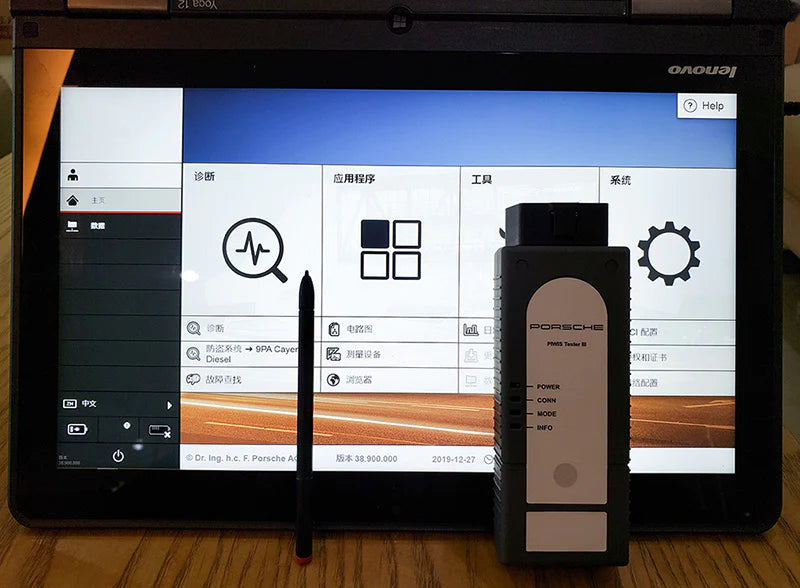
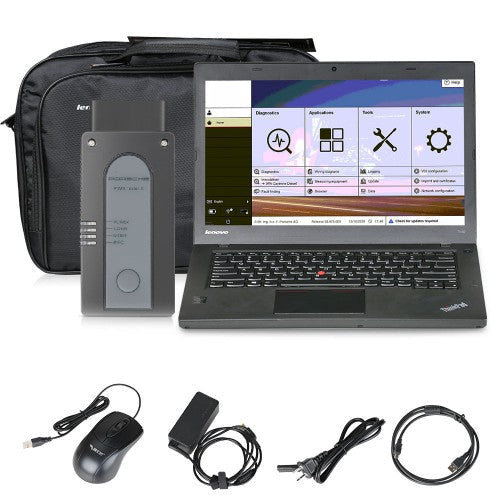
PIWIS III with V38.2+V43.6 Piwis 3 Software Installed on Lenovo Yoga i5 8g Touch Screen Laptop, Full Set Ready to Use.

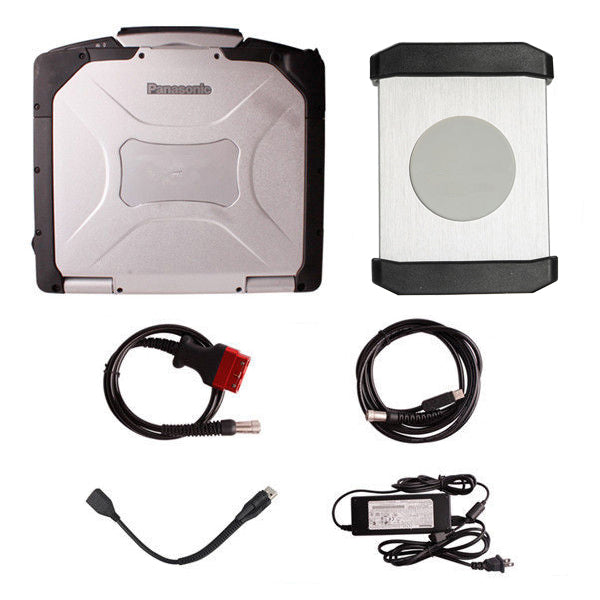
VXDAS Piwis III with Laptop Complete Kit Display:
Why Choose Piwis III with Lenovo Yoga Laptop Full Set from VXDAS?
1. Dual Software, more comprehensive data base & more guarantee for software broken
2. WIFI connection available, convenient for working, supports all till 2023
3. Laptop is foldable, work as PC & Tablet *Power on password 123456
Customer service: Support Online or Whatsapp
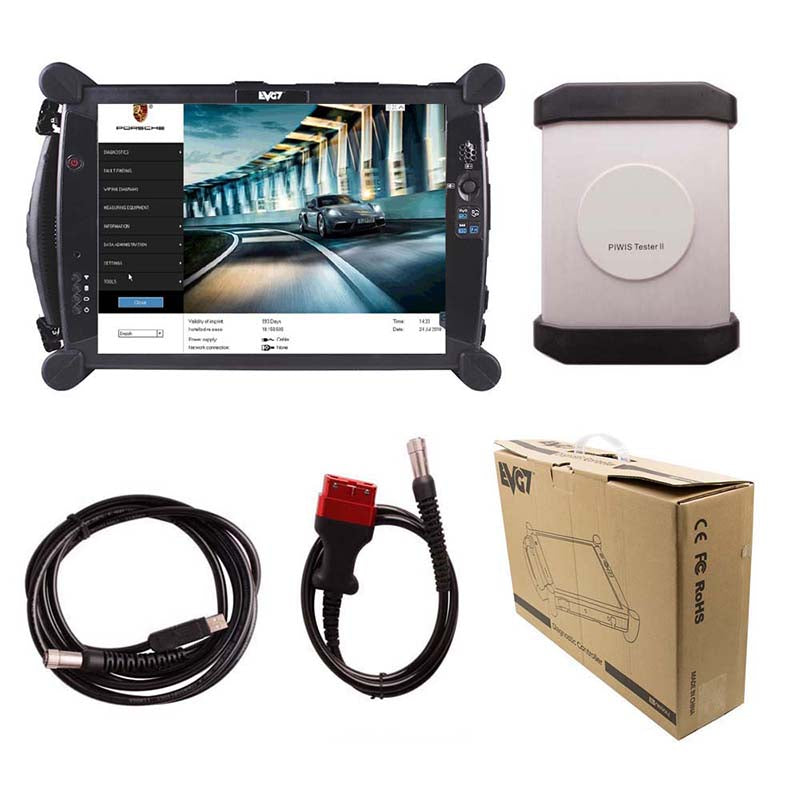
Piwis 3 PT3G VCI diagnostic interface with laptop Features:
- The firstly complete kit support car after till 2023
- Complete kit full set, no need activation by remote, or install software separately, all ready to use
- New DoIP Ethernet diagnostic technology, support new cars
- Luxury car diagnosis, ultra low threshold, exclusive support for the third generation diagnostic PIWIS 3
Piwis 3 PT3G VCI specification:
Interface: PT3C VCI
Support protocol: DoIP
Community: Via USB & wifi ( only with wifi supports )
Piwis 3 Laptop specification:
Brand: Lenovo
Model: Lenovo Yoga 260/12 (90% New, not brand new)
Processor: i5-6300U CPU, 8G RAM (send laptop CPU random, performance the same)
M2 SSD: 256GB
Touch Screen with pen
Note:
The laptop is not brand new, and it remove “Thinkpad” stickers for shipment. If you need a logo, please contact VXDAS sales to confirm.
Piwis 3 Software(Pre-install):
|
Software Version |
|
|
Operating System |
Windows 8 |
|
License |
Lifetime license, support update online |
|
Language |
German, English, US English, French, Italian, Spanish, Japanese, Chinese, Russia, Portuguese, Nederlands |
|
Update method |
by SSD (send back the laptop to update or get a new SSD here>> NOTE: SSD version is lower than complete kit) |
|
Vehicles coverage |
Support till 2023 |
|
Power on password |
123456 |
|
Feature Software (dealer-level software) |
Developer Mode (engineering software) |
|
PETKA 8.3 (electronic part catalogue) |
|
|
Wiring diagram |
Piwis III Functions:
Read/clear error code
Catch data stream
Computer programming match
Component test
Maintenance information consult
Components site drawing
Failed boot data was added after the upgrade
Enquiry Catalogue Parts
Piwis 3 Complete Kit Supports Car List:
911(997) (991)
Boxster/Cayman (987)
Cayenne up to MY 2010
Cayenne from MY 2011
Panamera
Especially the latest models:
Paramera (971) 2018
Caynenne (92A) 2018
Macan (95B) 2018
911 (991) 2018
996(after 2000)
and other old models
Note: this type piwis 3 can not connect with LAN cable to offer Internet
What’s the Difference between the Piwis 3 with a different SKU from VXDAS.com?
|
VXDAS PIWIS 3 Series Comparison |
|||
| Item No.(with Link) | SP36-4/sp39 | SP44-4 | SP44-5 |
| Out Look |
 |
 |
 |
| Price | $1,299 | $1,249 | $1,199 |
| Laptop Model | Thinkpad Yoga 260/S12 (Refurbished) | Panasonic CF-MX4 (Refurbished) | Panasonic CF-MX4 (Refurbished) |
| Operation System | Window 8 | Window 8 64-bit | Window 8 / Windows 10 64-bit |
| Processor | i5-6300U CPU | i5-4200 CPU | i5-5300U CPU |
| RAM | 8G | 4GB | 4GB |
| Hard Driver | SSD: 256G | SSD: 256GB/128GB | SSD: 500G |
| Touch Screen with Pen | √ | √ | √ |
| 360° Foldable(work as tablet) | √ | √ | √ |
| Power on password | 123456 | x | x |
| System | Dual Software | Single System | Dual System |
| Software Version |
V38.2+V43.6 |
V42.2 | V42.2 + V38.2 |
| Daignostic | √ | √ | √ |
| Engineering Mode | √ | √ | √ |
| DoIP | √ | √ | √ |
| circuit diagram | √ | √ | √ |
| Car coverage | Support part of car model before 2010, not all, depends on software database most car coverage from 2010-2022 |
||
| Update Method | SSD | online update via USB Dongle | SSD |
| License | Update online | Update online | Update online |
| Connection | Wifi/USB | Wifi/USB | Wifi/USB |
| Carry Box | x | √ | √ |
| Garanzia di 1 anno | √ | √ | √ |
| Notice | 1. In order to avoid other operating cause software problem, this piwis 3 System locked by factory, can not install any software in the laptop
2. Always display”No VCI connection” even the interface connection |
In order to avoid other operating cause software problem, this piwis 3 System locked by factory, can not install any software in the laptop |
unlock system & software support install printer by yourself |
Piwis 3 with Laptop Full Set Packing list:
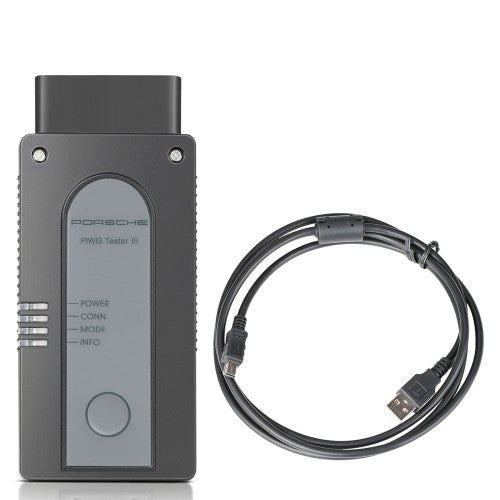
1pc x OEM PIWIS III Main Unit
1pc x USB cable
1pc x Lenovo Yoga Laptop with SSD (Used laptop, not brand new)
Piwis 3 with Lenovo yoga laptop Review & FAQs:
Q: Why Piwis 3 complete kit comes with 3 version piwis 3 software?
A: To make sure the piwis 3 with most complete vehicle database, VXDAS combine different version software together.
V42.400.037+V38.2 with a comprehensive diagnostic & engineering software database for old & new car
V41.100 come with latest diagnostic software database for the newest car.
Q: How to adjust screen brightness?
A: Computer Support Add New Press” F5 “F6 “To Reduce Or Increase The Screen brightness

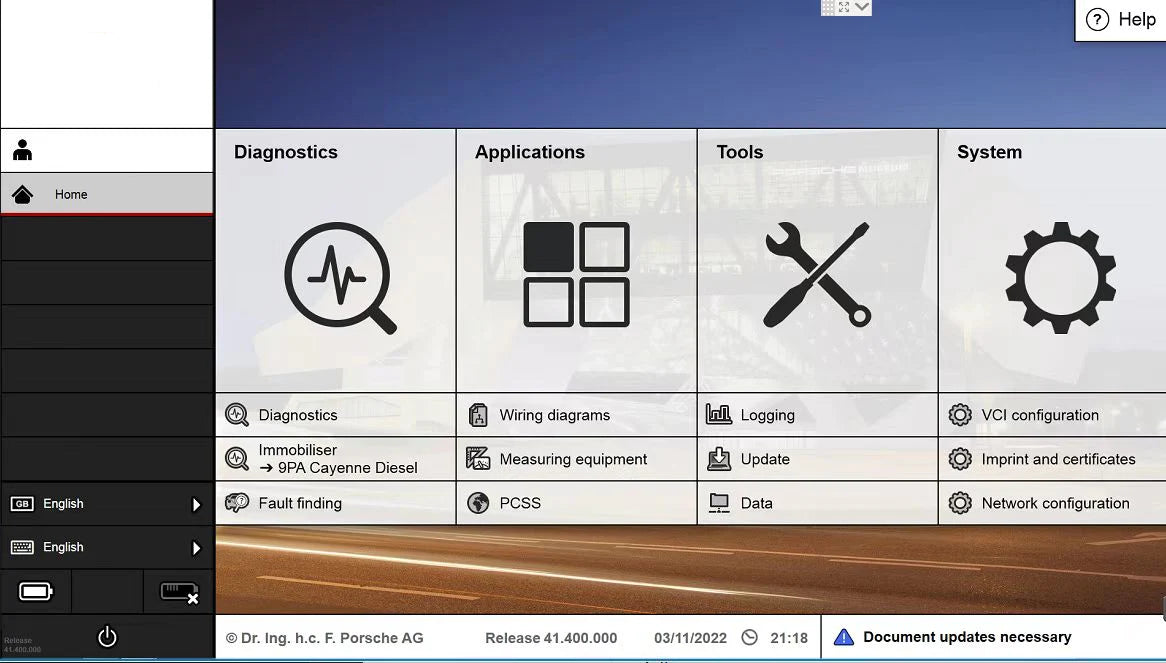
Piwis 3 Software V38.2+V43.6 Display:
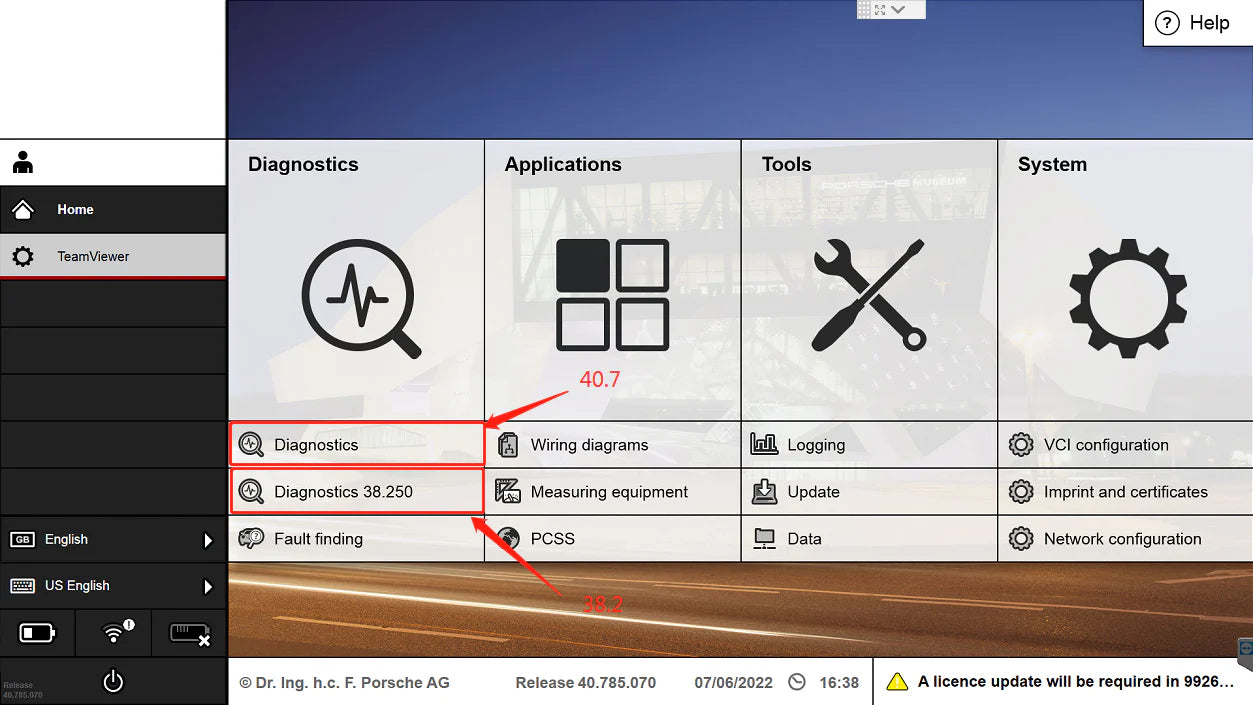
How to Choose Dual Software from PIWIS 3 software?

How to Set up VXDAS.com Piwis 3 Software langauge?


How to connect to wifi
V38.200/40.785 software can directly select wifi connection at the bottom right corner.
V41.100 software can only be networked from inside the software (method reference), the operation method is as follows
1.SYSTEM-Networconfiguration
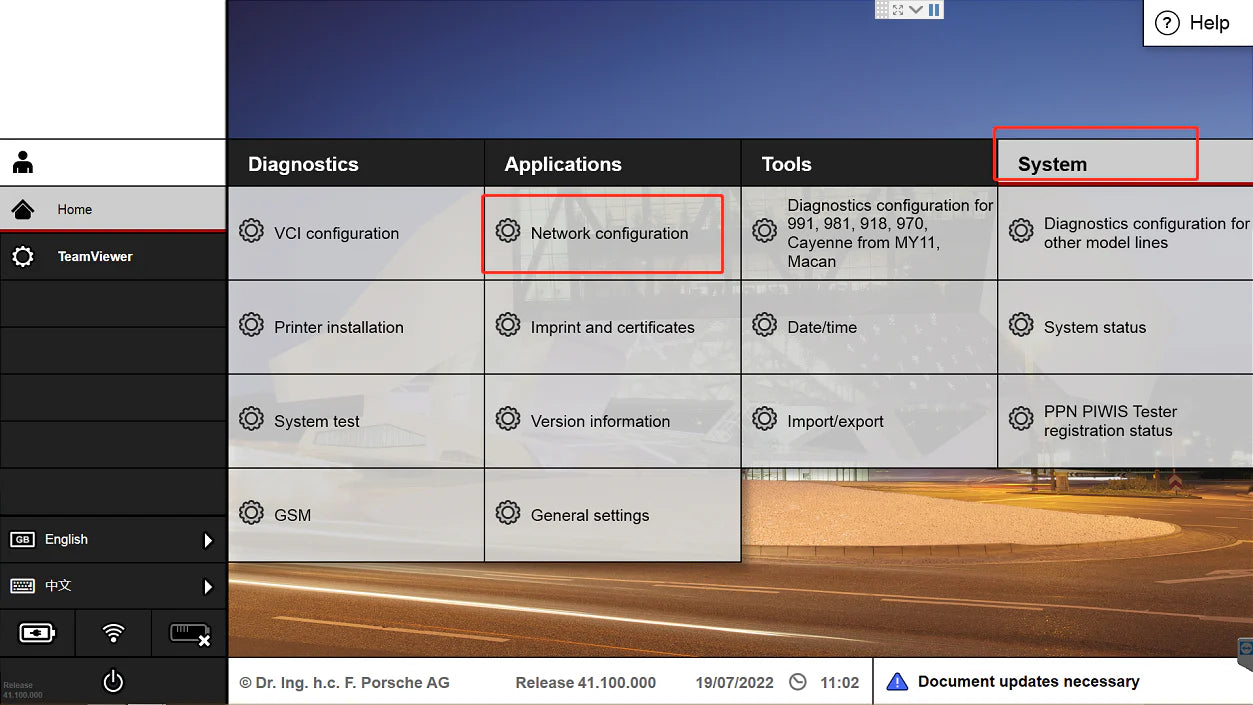
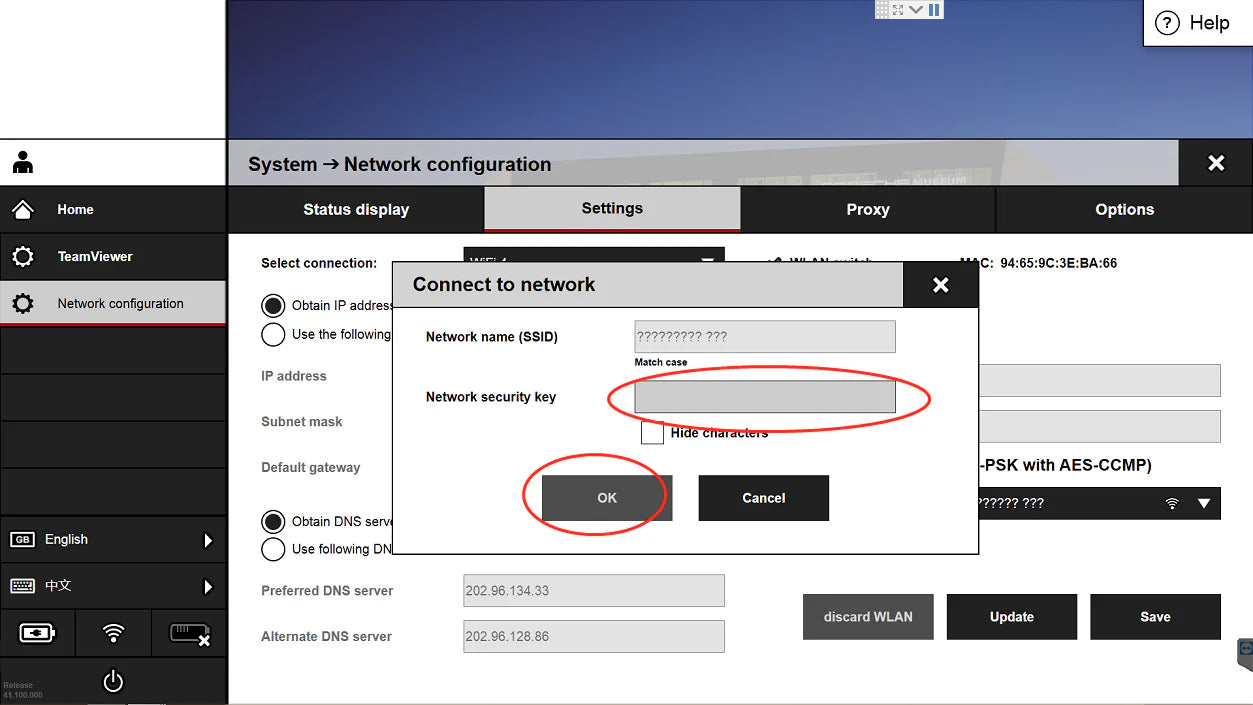
2. Settings – select connection – select wifi name – select save
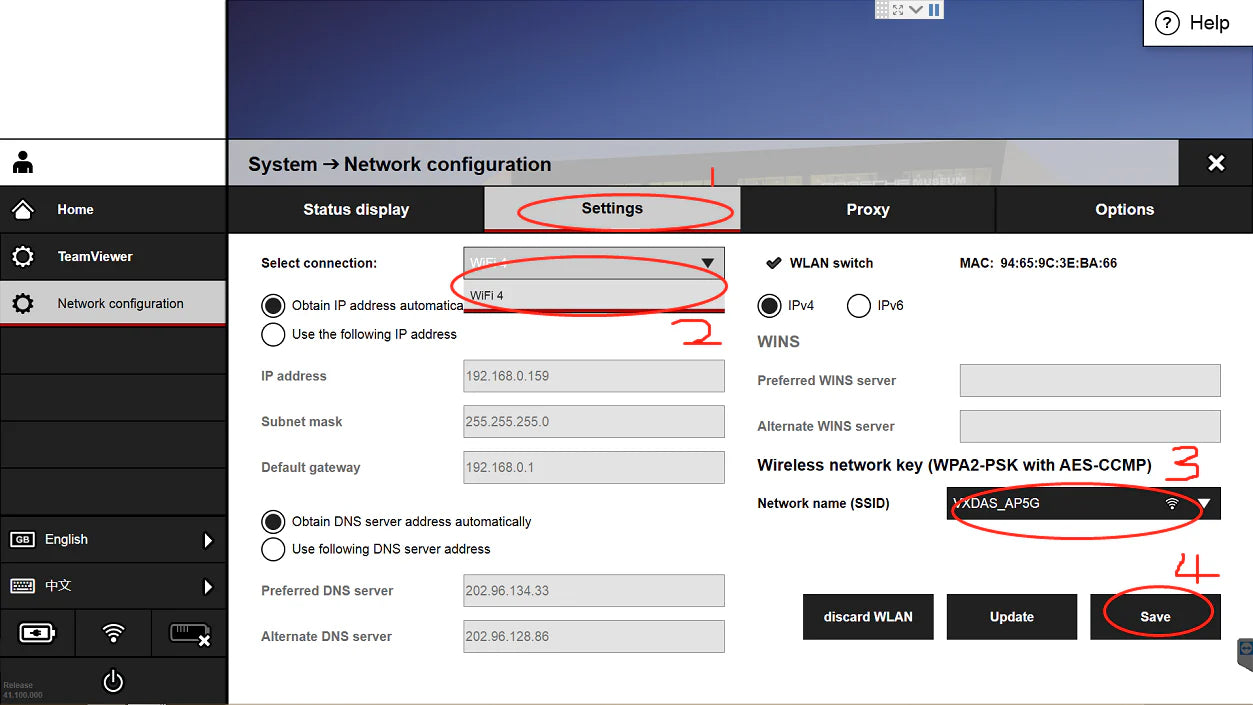
3.Enter password – Select connection
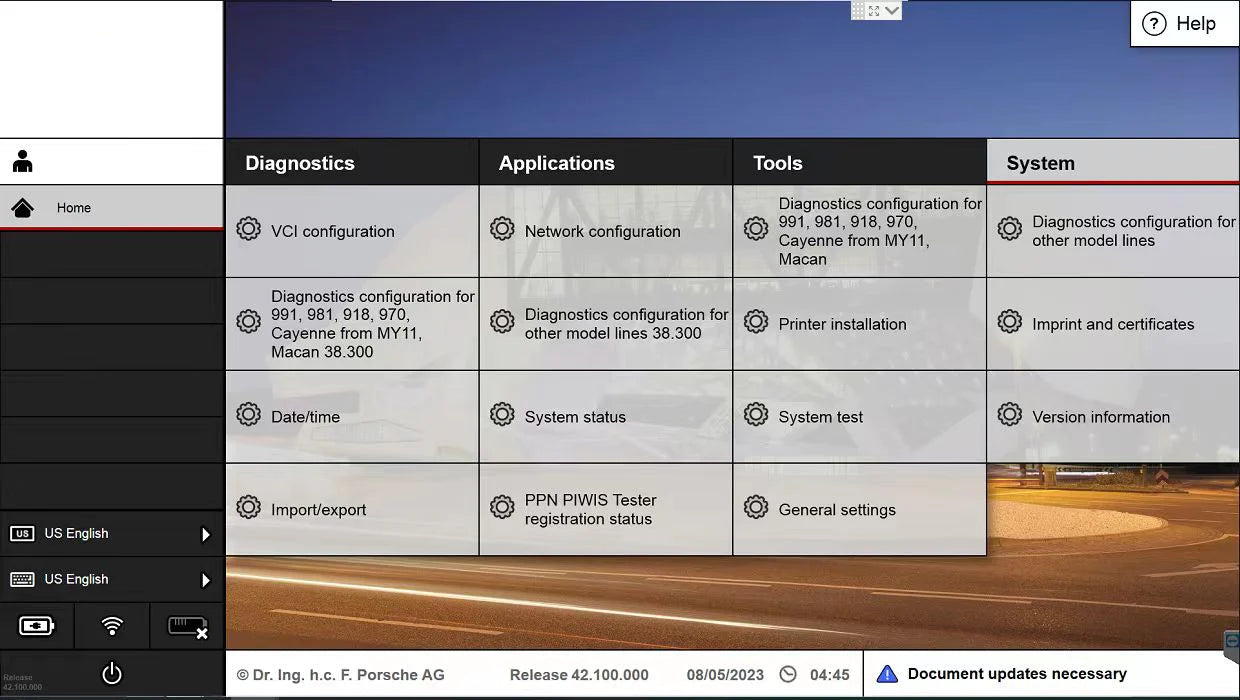
Piwis 3 Software Menu from VXDAS.com

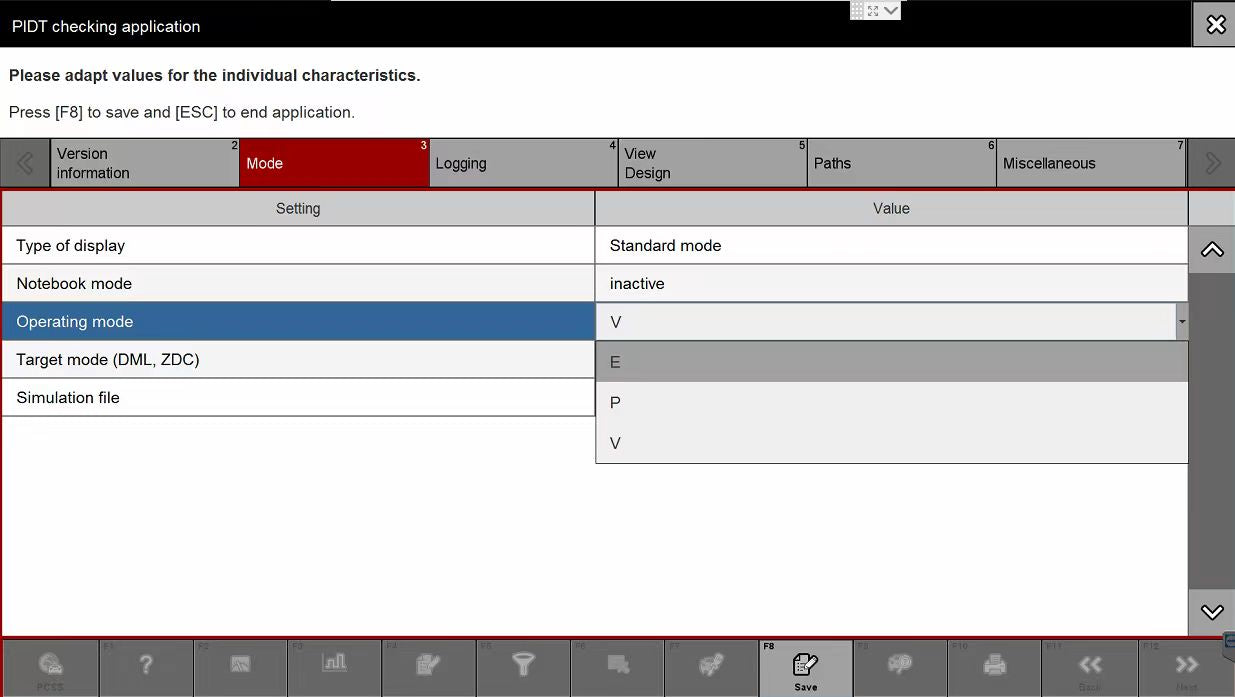
Piwis 3 developer mode setting PIWIS 3 engineering software programming
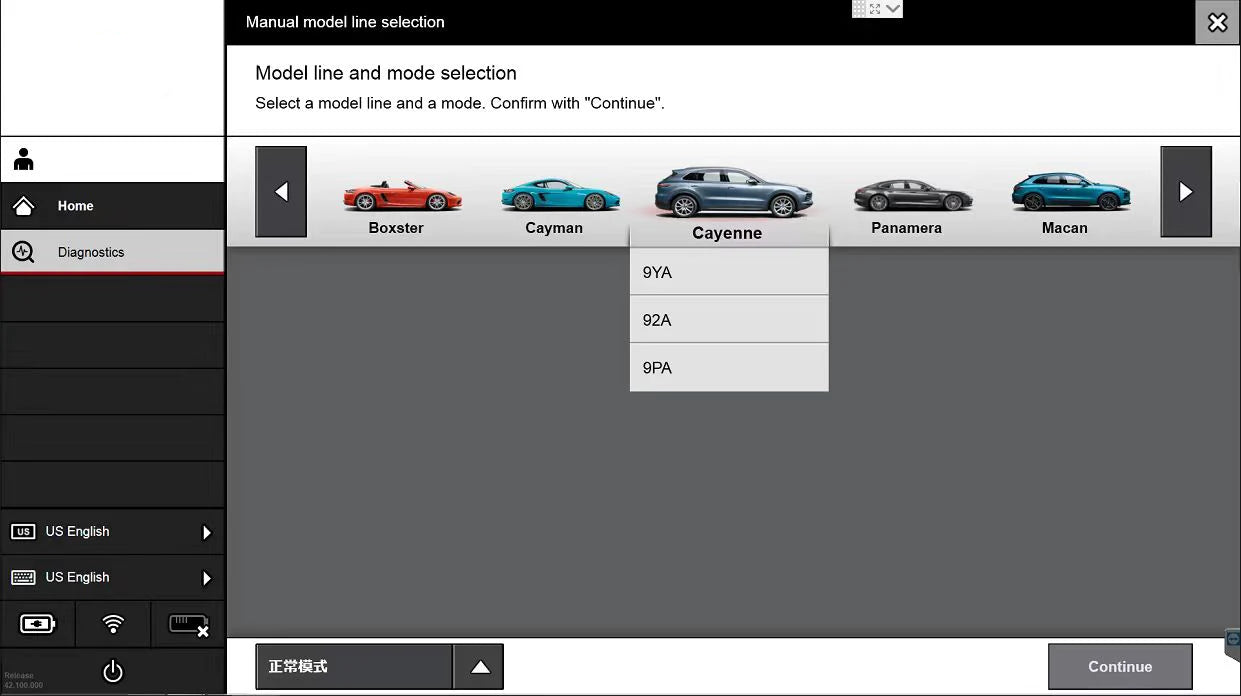
Piwis 3 diagnostic 2021 Macan Piwis 3 software faulry code selection

Piwis 3 software include wiring diagrams


laptop boot up button show
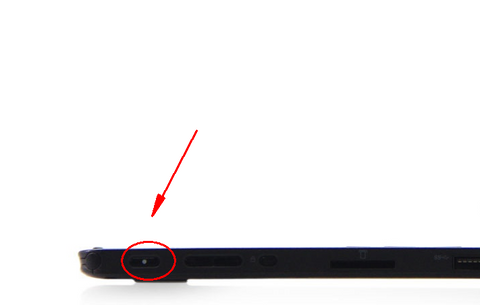
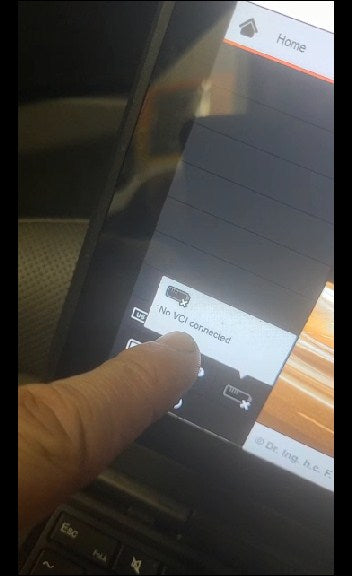
NOTE:
This type piwis 3 software can not show its connection between piwis 3 VCI hardware device with laptop, you can connect car to test it

Garanzia di rimborso
Investite nelle nostre attrezzature con assoluta fiducia, supportati dalla nostra garanzia di soddisfazione.

Garanzia di 1 anno
Il nostro team dedicato fornisce assistenza tempestiva e si impegna a rispondere alle vostre domande.

Servizio clienti
Il nostro team dedicato fornisce assistenza tempestiva e si impegna a rispondere alle vostre domande.
Marko –
Does the software Support update
Does the software Support update ?
Marko –
Does the software Support update
Does the software Support update ?
Maletaz –
Does it support engineering mode?
Does it support engineering mode?
Maletaz –
Does it support engineering mode?
Does it support engineering mode?
Herz –
The software has be installed ready to used
The software has be installed ready to used before the shipment, thanks
Herz –
The software has be installed ready to used
The software has be installed ready to used before the shipment, thanks
andra? –
can i use it on my own laptop?
I only need the device and software, can i use it on my own laptop
andraž –
can i use it on my own laptop?
I only need the device and software, can i use it on my own laptop
Gliana –
Piwis 3 wireless connection
Hi, I want to know if this support wireless connection, I didn’t find this information in your description, please confirm
Vann –
online programing
it can not suport online programing
Ali –
Piwis 3 support engineering mode
Hello, Does the Piwis 3 support engineering mode? Best regards, Ali
Dino –
When Does PIWIS 3 Software 39.7 Version Availbable
Hi, I have a few questions on PIWIS 3. Item SP36-1 1 – Is there a reason that I would want to run version 38 instead of version 39? 2 – I notice that your v39 software is 39.5. Autonumen sells a unit with 39.7. Do you plan on updating yours to version 39.7? If so, when? 3 – If I order today, how long would it take to get to me? I am in the US, zip code 08330 4 – Is shipping included in the price?
giuseppe –
protection component
hi, Is it possible when replacing some control unit, for example, to make the protection component and adapt it to the vehicle? thanks I wait for your news
Bill Clinton –
piwis 3 can support 996 GT3
I have pursched it, and I have tested with 996 GT3, it works well
Carter Larson –
reset an automatic handbrake, calibrate a PDK automatik transmission
I will try to use piwis 3 to reset an automatic handbrake, calibrate a PDK automatik transmission
Frank –
Piwis 3
Hi, the piwis 3 arrived well packed, but there is no vci connection in software, check with car no connection problem. Can you make connection better? My friend also want one set, he don’t like the connection not see, thanks
Taylor –
Lifetime customer service for Piwis
I’d love to leave a review to share my experience of shopping on VXDAS. 3 years ago I purchase piwis 2 for my workshop working on some of the Porsche cars. Until some clients send me some Porsche after 2017, I realized I need some new device, then I bought piwis 3 from VXDAS last year. every time when I ask for help with my software or hardware or something can not communicate, they‘d like to help me even though they claim warranty & technical support are only free for 1 year. till now VXDAS help me with remote technical support not paid. It’s worth paying VXDAS to get a quality-A device & service.
Henson –
PIWIS III for Porsche with V38.3+V41.900
this piwis 3 is not AUTOSOS product, but it can work with most Porsche cars
Francie –
PIWIS III for Porsche
I have a 2014 Porsche 911 turbo s and this piwis can code modules and Adapt boost actuators, and it also can code steering wheel
Isaac –
PIWIS III for Porsche with V38.3+V41.900
seller said piwis 3 can code ECU and reset oil service
Balfe –
key programming function with piwis 3
I want to use this piwis 3 to program key, but it can not program key. but I still appreciate seller offer me online after sale service
Sibyl –
ppn online account
thank you for free shipping way, and I receive the package soon, but this type piwis 3 can not work with PPN online account for Porsche cars
Elliot –
sku: SP39, piwis 3 can use WiFi Internet network
I already received this sku: SP39, and this type piwis 3 can use WiFi Internet network
Colter –
PIWIS III for Porsche
the Piwis 3 offers advanced programming and coding capabilities. It enables me to perform various programming tasks, such as ECU coding, key programming, and module adaptation. The intuitive interface and user-friendly navigation make the programming process smooth and efficient.
Zamir –
powerful tool for my car work shop working
Piwis 3 for Porsche cars has exceeded my expectations. Its comprehensive diagnostic functions, advanced programming capabilities, speed, and reliability make it an indispensable tool for anyone working with Porsche vehicles. I highly recommend it to professionals and enthusiasts alike.
Josiah –
professional diagnostic tool
the Piwis 3 for Porsche cars has exceeded my expectations. Its comprehensive diagnostic functions, advanced programming capabilities, speed, and reliability make it an indispensable tool for anyone working with Porsche vehicles. I highly recommend it to professionals and enthusiasts alike.
Zamir –
update piwis 3 software by disk drive
I wished to update my Piwis3 software and upon reaching out to VXDAS, they instructed me to return only the Piwis3 software hard drive. They committed to updating the software to its latest version after receiving the hard drive as part of their after-sales service. Now, I have already received the Piwis3 software hard drive with the latest updates installed.
Eithan –
piwis 3 software disk drive is 2.5 inch SATA mode
When I received the Piwis3, the software wouldn’t start and the screen remained black. After contacting VXDAS, they informed me that I needed to check if the software hard drive was loose and advised me to unplug and replug the Piwis3 software hard drive. Now, the Piwis3 software is functioning normally.
Oliver –
team viewer to solve piwis 3 problem
When my piwis3 encountered a problem, I directly sent teamviewer to let VXDAS help me remotely connect to the car to solve the problem
Vincent –
piwis 3 stickers in the box
My piwis3 box has been delivered to the company by DHL, but I can’t find the piwis3 sticker. After contacting VXDAS, I found the sticker hidden on the side of the box.
Isaiah –
piwis 3 WiFi Internet network connection
piwis 3 shows that WiFi cannot be selected in the PIWIS program. After contacting VXDAS, they reminded me that WiFi can be connected in the lower left corner.
Bennett –
printer cannot be installed together with piwis 3 software
I am from France and I want to install a printer because I need to print wiring diagrams. After contacting VXDAS, VXDAS told me that the piwis 3 software has limitations, so the printer cannot be installed together
Dan Paz –
Piwis 3
The hard drive arrived empty without the software.